

If you run Infor M3, you are likely sitting on years of accumulated technical assets. As opposed to technical debt (which you want to reduce over time), these assets took a ton of effort to build and refine. But they’re sitting latent in your system, waiting to be unlocked.
As we start to lean harder into GenAI (both at Doppio and for the clients we serve), I wanted to see how hard it would be to put a conversational layer on top of the business processes and ERP capabilities you already have to do exactly that.
So I built a small proof of concept. A Purchase Order Summary Agent, using Infor’s GenAI and the standard M3 capabilities. In the process I learned some interesting things.
The business question
The use case I had in mind was a purchasing user who needed more information about a purchase order. Right now that user needs to know which M3 program has the order, which panels to open, where the supplier and warehouse and quantity and delivery information live, and how records in different parts of M3 relate to each other.
While an experienced M3 user knows how to do this, an occasional user (a manager perhaps, or a support analyst covering an unfamiliar area) does not.
But what if the interaction started here instead?
“Show me the summary for purchase order 2000000148.”
That user wouldn’t need to know any of that stuff. The agent would know where to find it.
What I built
The proof of concept has three pieces, none of which requires new business logic.
An API Flow
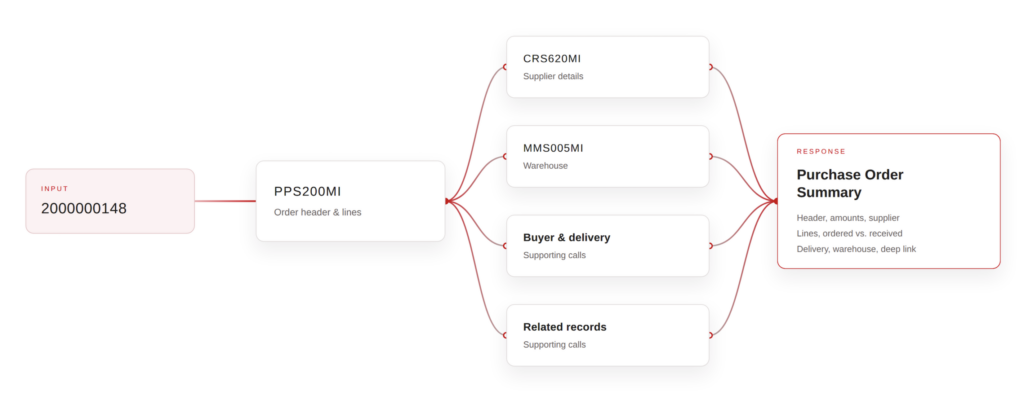
The flow takes a purchase order number and gathers everything a summary needs. It starts with PPS200MI for the order header and lines, then fans out in parallel: CRS620MI for supplier details, MMS005MI for warehouse information, and a handful of supporting calls for buyer, delivery, and related records.
This is pretty ordinary M3 integration work. If your team has built API Flows before, nothing here will surprise them.
A GenAI Tool
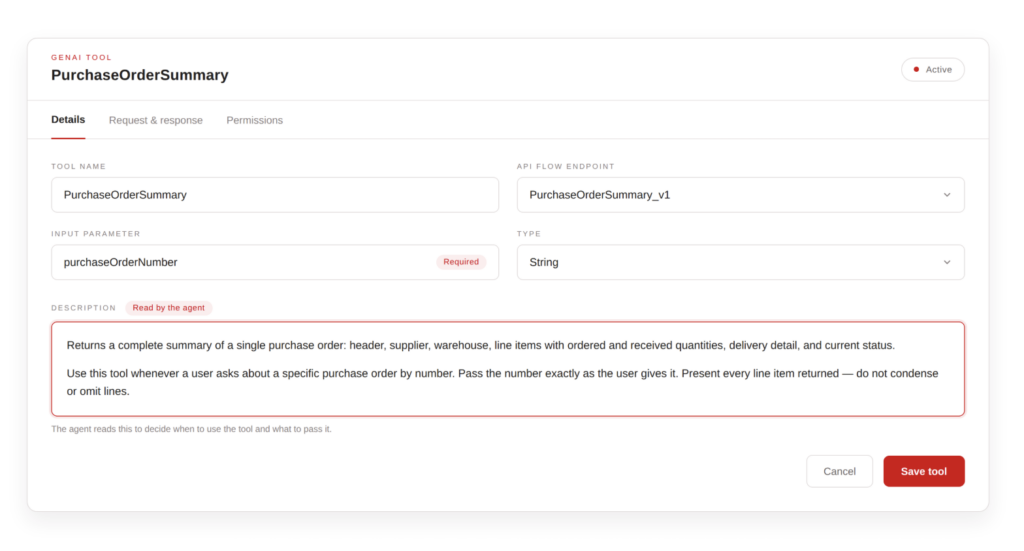
This is what makes that flow visible to the AI. It wraps the API Flow endpoint, and describes it in plain language. What the tool does, what input it needs (a purchase order number), and how to handle the request and response.
One thing I underestimated here: the agent reads that description to decide when to use the tool and what to pass it. Writing it clearly matters as much as building the flow itself.
A GenAI Agent
The agent’s instructions cover how to present results. It also has a rule I’d recommend to anyone building these: verify that the number of records returned by the API matches the number presented to the user.
Language models are good at summarizing, but they’re not always super careful about completeness. A purchase order summary that misses a line item is worse than no summary at all, so the agent is required to check its own output against the raw record count.
The architecture end-to-end looks like this:
User → GenAI Assistant → Agent → Tool → API Flow → M3
Everything to the right of the Agent in that chain already existed, or could have been built years ago with standard M3 skills. The agent adds an interaction layer over it.
What the user sees
With everything configured, the user opens the GenAI Assistant and types the request. GenAI identifies the right agent, the agent invokes the Tool, and the Tool executes the API Flow against live M3 data.
About thirty seconds later, the user has a formatted Purchase Order Summary. It includes header details, order amounts, supplier information, line items with ordered and received quantities, delivery and warehouse details, a short plain-English recap, and a deep link straight back to the PO in M3 if they want to work with the actual order.
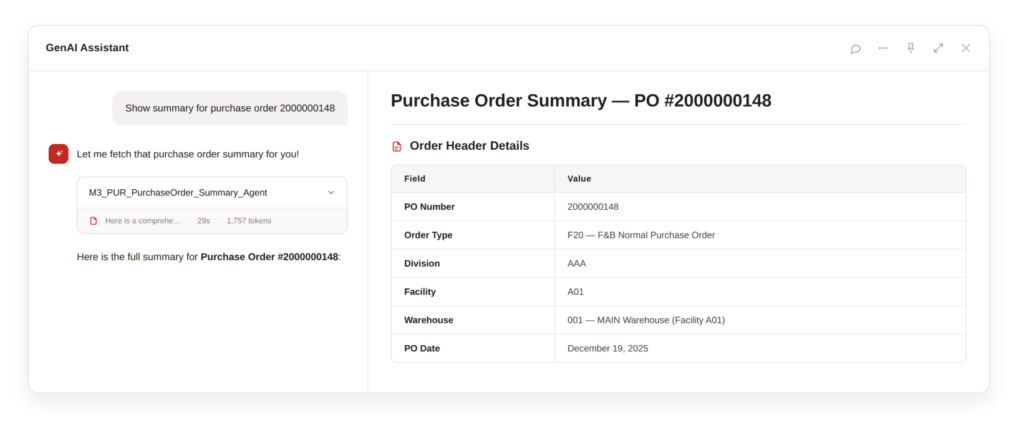
In our demo case, that meant seeing at a glance that PO 2000000148 is an order for 10 KG of chicken legs from a raw-materials supplier, worth $42.50, not yet received or invoiced. Which might sound like a small thing, but the user never opened an M3 program or needed to know where receipt information lives. Imagine that being able to happen 50 or 100 times per day.
It’s not perfect yet. It takes around 30 seconds to return – the answer is pulling from half a dozen places.
What I think this means
Organizations running M3 have built up deep technical knowledge around their APIs, integrations, and business processes. In the past exposing that knowledge to users meant needing to build another integration or workspace or report or custom interface. Which increased the surface area of stuff you needed to maintain.
GenAI allows you to have users reach all that stuff through natural business language. It can generate reports on the fly. It speeds up how quickly your team can access internal knowledge, without having to worry about long-term maintenance of a one-off dashboard, or allocating someone’s time to handle these kinds of requests.
It can open up all kinds of opportunities. Things like:
- “Why hasn’t this customer order shipped?” Pull information from the order, allocation, inventory, and delivery transactions.
- “Why did this order fail to integrate?” Collect the transaction details and error context.
- “What is preventing this order from being allocated?” Retrieve the blocking conditions and explain the situation.
All of this lives inside the ERP process knowledge. It just needs to be exposed to the agent. But that implies your M3 APIs, API flows, integrations, and business logic are in a good spot. It also is a new way of thinking for technical teams. We will increasingly need to think about which capabilities should be exposed as tools, and how to describe them so agents can use them safely. API questions are going to become some of the most important questions. M3 has more APIs than any other Infor ERP.
If you’re working with a vendor, I think that will require functional consultants who understand the business processes, and technical consultants who understand how that process is represented inside M3. (Which happens to be how Doppio is organized 😉.)